
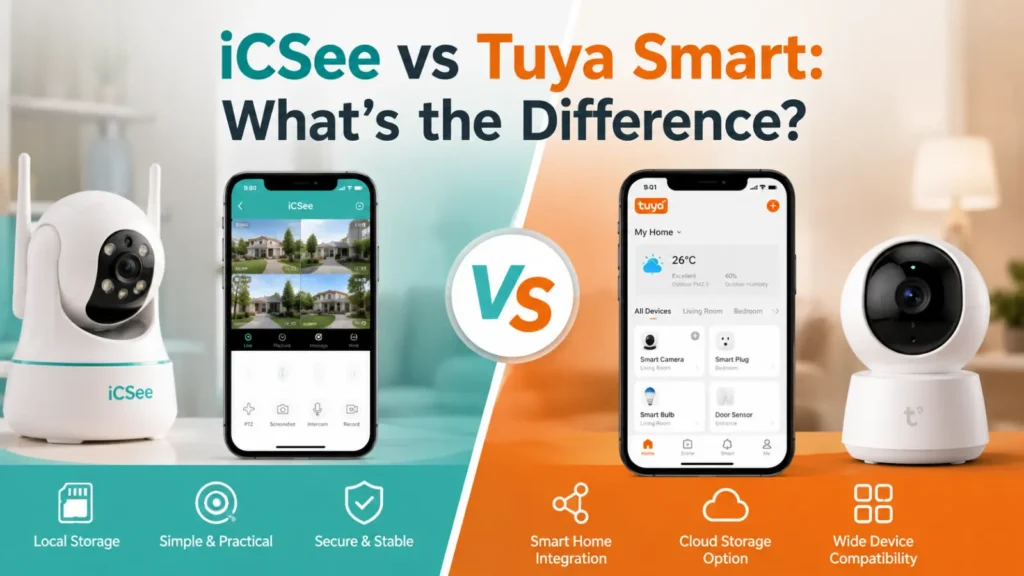

Bought a budget camera or NVR lately? You’ve probably seen one of these two apps. But most guides never explain what really sets them apart.
Here’s the short version: iCSee is a simple viewer app made only for cameras and recorders, licensed out to many small OEM factories. Tuya Smart is a full IoT platform — cameras, plugs, bulbs, sensors, and more all run on it, with automation and voice control built in from the start.
Think of it this way: iCSee is a tool for watching footage. Tuya is closer to an operating system for your whole smart home.
Core Differences at a Glance
| Factor | iCSee | Tuya Smart |
|---|---|---|
| Primary purpose | Video viewer for cameras, NVRs, DVRs | Full IoT platform for many device types |
| Device scope | Cameras and recorders only | Cameras, plugs, lights, locks, sensors, and more |
| Cross-brand device grouping | Limited, mostly per-device UID | Yes, different brands in one app |
| Voice assistant support | Rare, brand-dependent | Common, Alexa and Google Assistant |
| Apple HomeKit / Matter | Not supported | Growing support on newer devices |
| IFTTT support | Not officially supported | Official IFTTT service |
| Automation and scenes | Basic motion alerts only | Full scene and automation engine |
| Cloud model | P2P relay via device UID | Centralized cloud, account-based |
| Developer API | None official | Public API and SDK |
| Local storage | SD card or NVR hard drive, common | SD card on some models, less common |
| Cloud storage | Optional, brand-dependent | Common, subscription-based |
| Typical price | Low-cost, entry-level | Wide range, budget to mid-range |
| Best for | Standalone camera monitoring | Connected multi-device smart home |
iCSee and Tuya Device Compatibility
iCSee sticks to one job: it’s a security camera app for cameras, NVRs, and DVRs. No smart plugs. No bulbs. No door sensors. If a product page mentions iCSee, expect a video-only device.
Tuya works more like a smart home hub. One Tuya or Smart Life account can hold:
- Cameras and video doorbells
- Smart plugs and light strips
- Smart locks
- Water leak sensors
- Garage door openers
These devices often come from brands that have never heard of each other. That’s Tuya’s real strength. It’s not one device — it’s the shared app and shared automation rules.
Can you mix the two? Sort of. Many iCSee cameras can be added into the Tuya or Smart Life app. You scan the same QR code, or type in the device UID by hand.
But this is a one-way bridge, not full compatibility. Here’s what usually happens:
- You get basic live view and motion alerts in Tuya
- You do not get the camera’s full native feature set
- PTZ patrol patterns often don’t carry over
- Some proprietary NVR layouts get lost
- Manufacturer-specific settings may disappear
Tuya sees a generic camera profile. It doesn’t see the manufacturer’s custom iCSee build. You trade some features for broader ecosystem access.
For developers, Tuya has a real edge: a public IoT Cloud Development Platform, SDKs for multiple languages, and a hardware certification pipeline.
iCSee has no comparable program. There’s no official API for third-party integrators. That’s part of why iCSee rarely shows up in communities like Home Assistant, outside of unofficial, reverse-engineered integrations.
iCSee App vs Tuya App: Interface and Setup
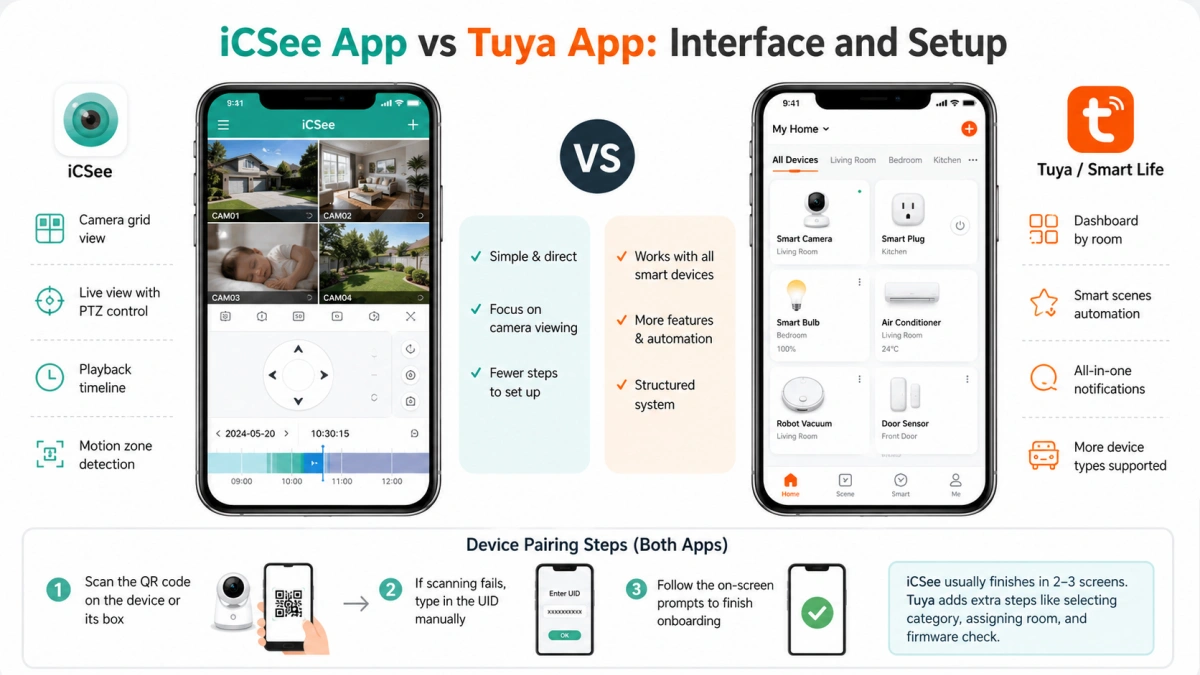
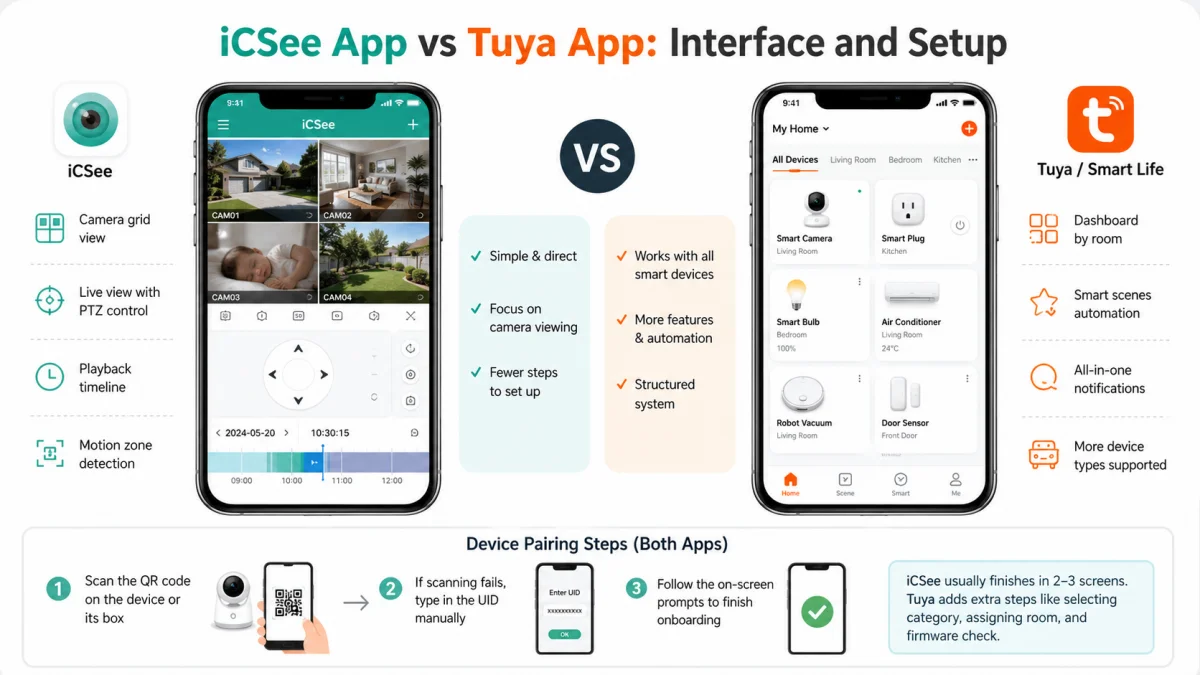
The iCSee app looks like a security DVR viewer from a decade ago, just resized for a phone screen.
What you get:
- A grid of camera thumbnails
- A live view screen with PTZ arrows (if supported)
- A timeline scrubber for playback
- A motion-zone editor for drawing detection boxes
It’s simple. Sometimes clunky. It doesn’t try to be more than a viewer.
Tuya’s app (or its twin, Smart Life) works more like a dashboard. Devices show up as tiles, grouped by room. Cameras sit next to your other smart devices, not off in their own corner.
Tuya also adds features iCSee skips entirely: energy monitoring for smart plugs, a drag-and-drop scene editor, and one unified notification feed across all device types.
If your camera has two-way audio or AI person detection, Tuya tends to expose those settings more clearly. This varies by manufacturer, though.
Device pairing steps are fairly similar on both apps:
- Scan the QR code on the device or its box
- If scanning fails, type in the UID manually
- Follow the on-screen prompts to finish onboarding
iCSee usually finishes in two or three screens. Tuya adds a step or two — picking a device category, assigning a room, sometimes a firmware check — because it’s slotting your device into a bigger structured system.
Smart Home and Voice Assistant Integration with Tuya
This is one of the clearest splits between the two platforms. If you want full home automation across cameras, smart locks, and other devices, this section matters most.
iCSee on its own has no consistent voice assistant support. A few OEMs bolt on limited Alexa skills for specific models, but there’s no platform-wide integration to rely on.
If you want "Alexa, show the front door camera" to work, pure iCSee usually won’t get you there.
Tuya solves this differently. Link your Tuya or Smart Life account to Alexa or Google Assistant, and every compatible device becomes voice-controllable at once. Cameras included.
This is also the workaround for iCSee users:
- Add the iCSee camera into the Tuya app first (see the bridging steps above)
- Link that Tuya account to Alexa or Google Home
- Voice control now works, though some native iCSee features may not
Apple HomeKit: Growing on the Tuya side, thanks to Matter certification on newer devices. Coverage is still spotty and depends on whether your specific manufacturer got certified. iCSee has no HomeKit story at all.
IFTTT: Tuya has an official IFTTT service with a decent library of applets. iCSee doesn’t appear on IFTTT in any official way.
If cross-app automation matters to you, that’s a strong reason to route everything through Tuya.
iCSee vs Tuya: Data Privacy, Security, and Storage
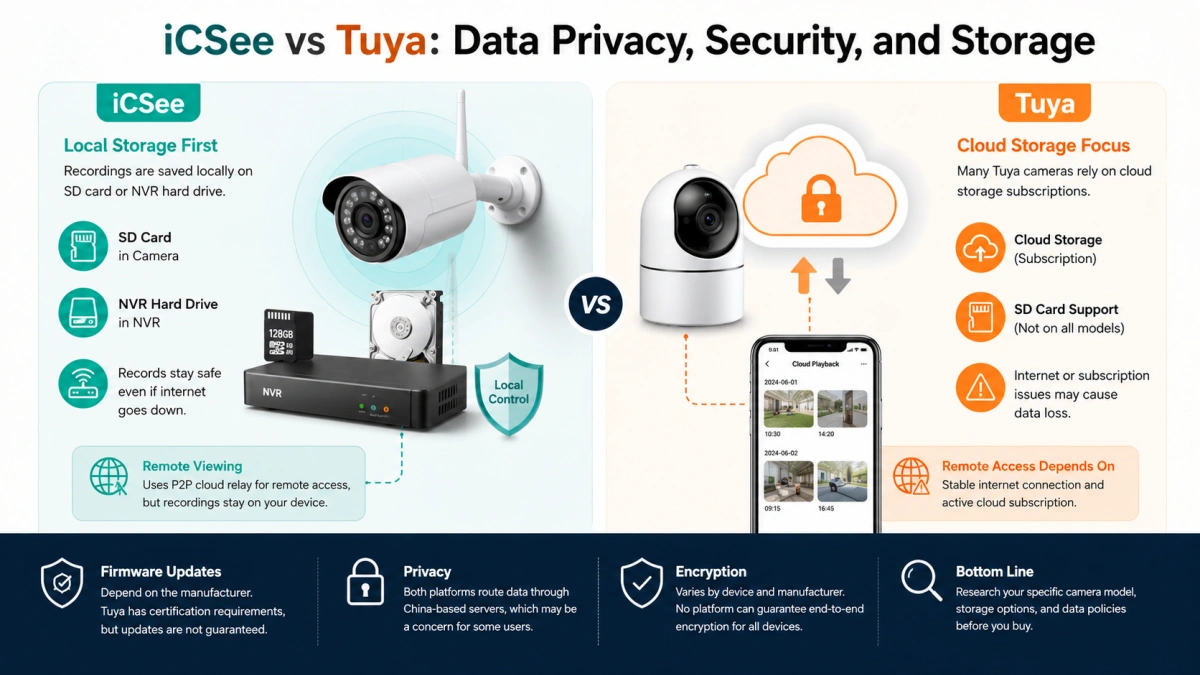
Storage is where these two platforms really diverge day to day. This matters most if remote monitoring and video surveillance are your main reasons for buying a camera in the first place.
iCSee cameras and NVRs are built around local storage first — either an SD card in the camera or a hard drive in the NVR box.
This means you can review footage even if your internet goes down. The recording never has to leave the building. Remote viewing from outside your network still needs the P2P cloud relay, but old footage on the card stays put even if that relay has issues.
Tuya cameras lean more toward cloud storage subscriptions. Many models still support a local SD card as backup or a free-tier option, but not all do.
If a Tuya camera is cloud-only and your internet drops, or your subscription lapses, you could lose access to recent recordings. There’s often no local buffer to fall back on. Check the storage options for your exact model before you assume either way.
Firmware updates are inconsistent on both sides, and it comes down to the manufacturer, not the app. Tuya’s certification rules push partners toward slightly more regular updates on average, but that doesn’t mean guaranteed updates — plenty of Tuya devices still go a year or more without a patch. iCSee has no certification gate at all, so update frequency is a coin flip.
On privacy: both platforms route account data and remote access through China-based infrastructure. That’s a real concern for some US buyers, given ongoing scrutiny of China-linked IoT and camera brands.
Encryption quality varies by device, not by platform. Some manufacturers use strong end-to-end encryption. Others use weaker, outdated schemes. Neither iCSee nor Tuya as companies can fully guarantee what a given OEM actually shipped. If cross-border data handling is a dealbreaker, research it at the product level.
iCSee and Tuya Pricing, Subscriptions, and Long-Term Costs
iCSee hardware tends to sit at the low end of the price range. Usually no subscription is required if you’re fine using an SD card or NVR hard drive for storage.
Some brands offer an optional cloud plan for off-site backup. That plan is priced and run by the individual manufacturer, not by iCSee itself. iCSee doesn’t operate its own unified cloud storage business.
Tuya hardware spans a much wider price range — from cheap basic cameras to pricier models with onboard AI features like person or package detection.
Cloud storage subscriptions through Tuya’s Smart Life platform are common, usually tiered by the number of days of footage retained and the number of cameras covered.
That cost adds up fast if you run more than one or two devices.
Long-term costs to budget for, on either platform: SD cards wear out from constant read/write cycles and eventually need replacing, NVR hard drives can fail after a few years of continuous recording, and cloud subscriptions are a recurring cost for as long as you want off-site backup.
One more thing to know before a full rebuild: switching from iCSee to Tuya, or the reverse, isn’t just a new app download. Compatibility is baked into the device’s firmware at manufacture. Migrating ecosystems usually means buying new hardware, not just changing which app you open.
Building a Practical Setup With iCSee and Tuya
For most US households building out a home automation ecosystem, a mixed approach works well. Use cheap iCSee-based cameras for straightforward spots — front door, driveway, garage — where local SD storage keeps costs low and footage available during outages. Then bring everything into a Tuya or Smart Life account for lights, locks, sensors, and voice control, adding those iCSee cameras too using the bridging method above.
This gives you cheap, dedicated camera hardware plus a broader smart home layer for everything else. Check current listings for your specific camera or hub before buying, since pricing and included storage change often.
FAQ
Does iCSee support Alexa, Google Assistant, or Siri voice commands?
Not natively, and not consistently. A few OEMs add limited Alexa support for specific models. Adding the camera to Tuya or Smart Life first is the common workaround.
Can I view iCSee camera feeds without an internet connection?
Locally, yes — if your setup uses an SD card or NVR hard drive, you can review recorded footage on-site without internet. Remote viewing from outside your network still needs the P2P cloud relay.
How do I add my iCSee camera to the Tuya Smart or Smart Life app?
Scan the same QR code on the device or its box, or enter the device UID manually — the same way you’d add it in iCSee. This gets you basic live view and alerts, not the camera’s full native feature set.
Which platform has stronger data privacy and security protections?
Neither has a built-in edge. Both route data through China-based infrastructure. Encryption quality depends on the individual manufacturer, not on iCSee or Tuya as companies.
Is Tuya Smart compatible with Apple HomeKit and IFTTT?
Partially. Newer Matter-certified Tuya devices can work with HomeKit, though certification varies by manufacturer. Tuya also has an official IFTTT service. iCSee supports neither.
How often do iCSee cameras receive firmware updates?
It depends entirely on which OEM made your camera. There’s no platform-wide update schedule behind iCSee, unlike Tuya’s certification pipeline (which is still imperfect, but exists).
Are there user forums or community support options for iCSee and Tuya?
Tuya has a bigger footprint in home automation communities like Home Assistant and Reddit’s r/smarthome, thanks to its open developer program. iCSee shows up far less, mostly in scattered camera-specific forums and unofficial integration threads.